Your .env is not a secret.
AI can read it.
Tene is a local-first encrypted secret manager CLI. It encrypts your API keys with XChaCha20-Poly1305 and injects them at runtime, so Claude Code, Cursor, and other AI agents never see plaintext values.

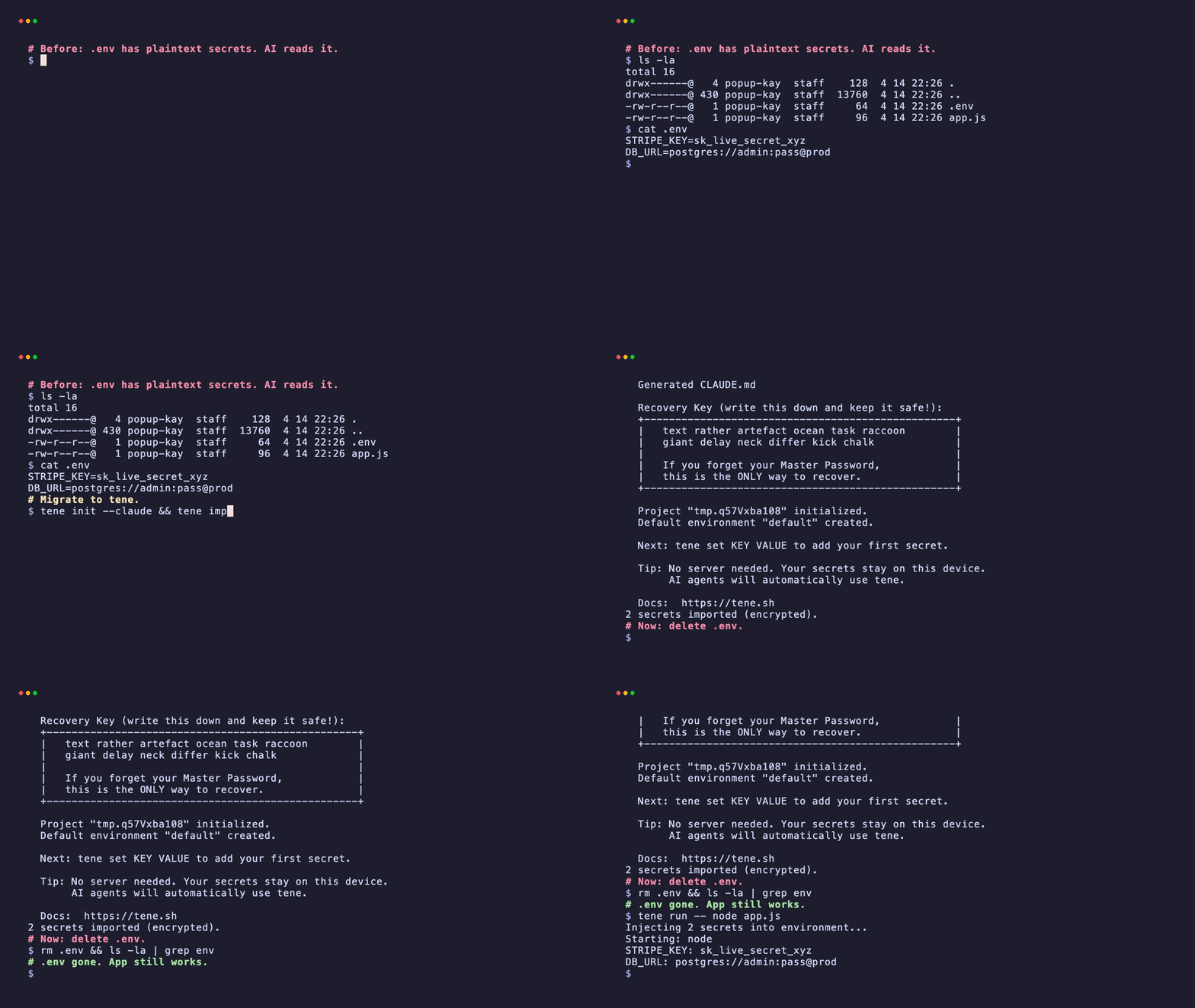
From .env exposure to encrypted runtime injection — under 1 minute.
.env is the problem. Tene is the fix.
AI agents read your project files. That includes .env. Tene encrypts secrets and injects them at runtime.
.env is visible to AI
AI agents read all your project files — including .env. Your API keys are sent to AI models as plaintext.
Runtime injection
tene run injects secrets as environment variables. Your app works normally. AI never sees the values.
Encrypted vault
XChaCha20-Poly1305 + Argon2id. Secrets stored locally in an encrypted SQLite vault.
One command setup
Install, init, set — done. No signup, no config files, no dashboard.
.env migration
tene import .env converts all your existing secrets into the encrypted vault. Zero friction.
AI agent rules
tene init auto-generates context files for 5 AI editors — Claude Code, Cursor, Windsurf, Gemini, and Codex. AI knows how to use tene safely without configuration.
Up and running in 1 minute
Install
One command. Auto-detects your OS and installs the latest binary. No Go required, no account, no server.
Project Initialize
Navigate to your project folder first. Creates an encrypted vault, generates context files for Claude, Cursor, Windsurf, Gemini, and Codex, and issues a 12-word recovery key.
Store secrets
Secrets are encrypted with XChaCha20-Poly1305 and stored in a local SQLite vault. Never leaves your machine.
Develop with secrets
Injects all secrets as environment variables into any command. Claude Code reads CLAUDE.md and knows the rest.
No server. Nothing to hack.
While .env files expose secrets to every AI agent in your project, Tene keeps them encrypted on your device. No server to breach, no database to leak, no API to exploit.
Encryption architecture
// Server: none
// Attack surface: none
Open source — verify it yourself
Every line of encryption code is open source. Don't trust us — read the code. github.com/tene-ai/tene
Trusted by developers building with AI


“I've wanted this for months. The `tene run --` flow means I can trust Claude Code again in this repo — no more `.env` panic every time the agent loads project files.”
“Migrated off dotenv-vault after their Pro shutdown. `tene import .env` took 30 seconds and now secrets never leave disk unencrypted.”
Built by @agent-kay, a developer tired of leaking API keys to AI agents.
Open source · MIT · No tracking · No vendor lock-in.
How Tene compares
The only tool that hides secrets from AI agents while keeping everything local and free.
| Tene | .env | Doppler | Vault | Infisical | |
|---|---|---|---|---|---|
| Secrets hidden from AI | |||||
| Local-first | |||||
| No server required | |||||
| Encrypted at rest | |||||
| AI agent auto-detect | |||||
| Runtime injection | |||||
| No signup required | |||||
| Open source | |||||
| Price | $0 | $0 | $21/mo | $1,152+ | $6/mo |
From the Blog
Tools · Engineering · Vibe Coding · Philosophy


FAQ
Why is .env dangerous with AI agents?
AI coding agents like Claude Code, Cursor, and Windsurf read all files in your project directory — including .env. This means your API keys, database passwords, and tokens are sent to AI models as plaintext context. You have no control over how that data is processed or stored.
How does Tene keep secrets from AI?
Tene stores secrets in an encrypted SQLite vault (.tene/vault.db). When you run tene run -- claude, secrets are injected as environment variables at runtime. The AI agent sees the tene run command in CLAUDE.md, but never sees the actual secret values.
What is Tene?
Tene is a local-first, encrypted secret management CLI. It stores your API keys, tokens, and credentials in an encrypted vault on your device. Single binary, no runtime needed, no server, no signup.
How do I install Tene?
Run: curl -sSfL https://tene.sh/install.sh | sh — it auto-detects your OS and installs the latest binary. Works on macOS, Linux, and Windows (WSL). No Go required.
Is Tene free?
Yes, Tene is 100% free and open source under the MIT license. All local features — encryption, runtime injection, multi-environment, AI editor rules — are free forever with no limits.
Which AI Agents does Tene support?
Tene supports Claude Code, Cursor, Windsurf, Gemini, and Codex. When you run tene init, it auto-generates context files for each editor (CLAUDE.md, .cursor/rules/tene.mdc, .windsurfrules, GEMINI.md, AGENTS.md). Each AI editor reads its file and knows how to use tene automatically — no manual setup needed.
What encryption does Tene use?
XChaCha20-Poly1305 for secret encryption with 192-bit random nonces. Argon2id (64MB memory, 3 iterations) for key derivation. Master key stored in your OS keychain. 12-word BIP-39 recovery key.
Will there be team features?
Team sync and collaboration features are being designed. The goal is encrypted team sync without a central server. Join the waitlist at tene.sh to get notified when it launches.
Stop using .env files.
Encrypt your secrets. Inject at runtime. AI never sees them. No signup. No server. Free forever.