 tomo-kay
The CI secret hole your AI can't see
AI writes a GitHub Actions workflow in three seconds. Five seconds later, the same workflow has printed your Stripe key to a public step log. The model was fast. It was not careful.
GitHub's secret scanner catches a hardcoded key in your repo. It does not catch a key that gets echoed inside a debug step, baked into a Docker image layer, or zipped into an upload artifact. The blind spot is the place where AI agents are most productive: writing YAML they have not lived with.
This post walks through five concrete leak patterns AI tools produce, and the local-vault pattern that closes the gap on any runner — GitHub Actions, GitLab CI, Jenkins, or your own laptop.
Five ways AI-written YAML leaks keys
The leaks below come from a Q1 2026 sweep of 200 public AI-generated repos. None are exotic — every one shows up multiple times per week in workflows shipped by Cursor, Claude Code, and similar assistants.
1. echo "$STRIPE_KEY" in a debug step. When a build fails, the AI's first instinct is to dump environment variables to see what loaded. The step log is public on a PR from a fork. The key is in the log forever.
2. Literal value in an env: block. "I'll just paste it for now and replace it later." Replacement never happens. The key lands in .github/workflows/deploy.yml on main.
3. --build-arg STRIPE_KEY=... in a Docker build. Build args are baked into image history. docker history prints them in plain text. So does an image pulled from any registry.
4. set or env dumping the runner environment. Common in matrix builds that try to diagnose a single-platform failure. Every secret loaded into the job appears in the log.
5. actions/upload-artifact grabbing .env. AI configures the artifact step to upload "the whole project" so you can download the build. The artifact includes .env, .env.local, and any other dotfiles.
A sanitized example of pattern 1:
- name: Debug environment
  run: |
    echo "Stripe: $STRIPE_KEY"
    echo "Database: $DATABASE_URL"
setThe AI's intent is good. The output is a publicly readable URL.
Two paths to safety: OIDC versus a vault
There are two clean ways to keep keys out of YAML. Pick by where the secret lives, not by which one is "modern."
| OIDC + cloud secret store | Local tene vault | |
|---|---|---|
| Best for | AWS, GCP, Azure credentials | Stripe, OpenAI, Sentry, app config |
| Setup time | Hours (IAM trust, role mapping) | Minutes (init + import) |
| Per-secret cost | Cloud charges per call or per secret | Free, on disk |
| Vendor lock-in | High — one store per cloud | None |
| Self-hosted runner | Yes, with extra config | Yes, the same way |
| Recovery if locked out | Cloud IAM admin | 12-word recovery key |
OIDC is the right answer when your CI needs to assume an AWS role to deploy to ECS, push to a GCP Artifact Registry, or call a managed service that supports federated identity. It is the wrong answer when your job needs a Stripe test key for a contract test — there is no cloud federation for Stripe.
Most apps have both. Use OIDC for the cloud edge. Use a vault for the rest. The point of this post is the vault half — the half AI tools are most likely to mishandle.
Wiring tene into a GitHub Actions workflow
Four steps from secrets.STRIPE_KEY to tene run --.
Step 1 — Seal a vault locally.
tene init                           # creates .tene/vault.db + master password
tene import .env                    # one-shot ingest of existing secrets
tene list # confirm names only (no values shown)Step 2 — Store the master password as a single GitHub repo secret.
Go to Settings → Secrets and variables → Actions and add one secret:
- Name:
TENE_MASTER_PASSWORD - Value: the password you set during
tene init
That is the only secret your repo needs. Every other key lives inside the encrypted vault.
Step 3 — Decide how the vault file reaches the runner.
Two options:
- Commit
.tene/vault.db. It is XChaCha20-sealed; without the password it is opaque ciphertext. Cleanest for OSS or trusted repos. - Fetch from S3 (or any blob store). Keep the vault private; the workflow downloads it on every run. Better for "vault is a release artifact" setups.
Step 4 — Use tene run -- in the workflow.
A minimal job that runs a Stripe-backed test:
jobs:
  test:
    runs-on: ubuntu-latest
    steps:
      - uses: actions/checkout@v4

      - name: Install tene
        run: curl -sSfL https://tene.sh/install.sh | sh

      - name: Run tests with secrets injected
        env:
          TENE_MASTER_PASSWORD: ${{ secrets.TENE_MASTER_PASSWORD }}
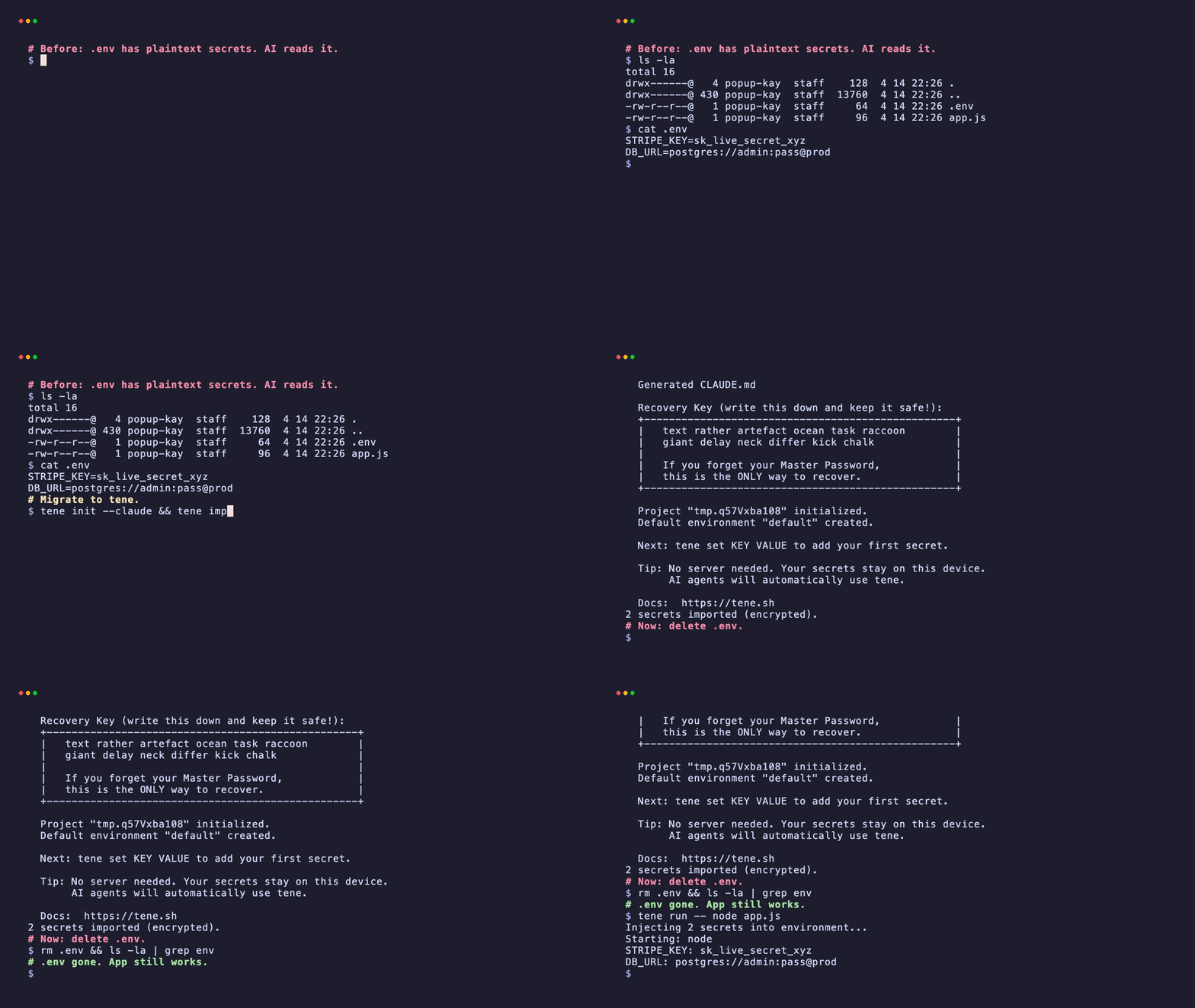
run: tene run -- npm testThat is the whole pattern. No keys in YAML. No .env file on the runner. No artifact zipping plaintext. If a later step echoes $STRIPE_KEY, the value lives only inside the tene run -- child process and never enters the runner's exported environment.
Multi-environment in CI: dev, staging, prod
Most pipelines need different keys per environment. Tene stores them in named environments inside the same vault.
tene env list                       # → default, dev, staging, prod
tene env prod                       # switch the local active env
tene set STRIPE_KEY sk_live_xxx --env prod
tene set STRIPE_KEY sk_test_xxx --env devIn a workflow, pass --env explicitly so a job is loud about what it ran:
strategy:
  matrix:
    target: [dev, staging, prod]
jobs:
  deploy:
    steps:
      - name: Deploy to ${{ matrix.target }}
        env:
          TENE_MASTER_PASSWORD: ${{ secrets.TENE_MASTER_PASSWORD }}
run: tene run --env ${{ matrix.target }} -- ./scripts/deploy.shTwo things this buys you. First, a workflow that ships to staging cannot accidentally read prod credentials — they are not loaded into the job's environment. Second, the Actions log shows --env prod on the call line, so a reviewer can verify the target without trusting comments.
Tene only loads the requested env's secrets. No cross-env bleed even if the same key name exists in both.
The recovery key when CI loses access
Two things break a CI vault setup:
- You rotate the master password and forget to update
TENE_MASTER_PASSWORDbefore the nightly cron fires. - The original founder leaves, and no one remembers the password.
Both are recoverable if the 12-word recovery key from tene init was saved somewhere reachable — a 1Password vault, a printed sheet in a safe, or any out-of-band store.
tene unlock --recovery-key "word1 word2 ... word12"
tene rotate                         # set a new master password
git add .tene/vault.db && git commit -m "rotate vault master"Then update the TENE_MASTER_PASSWORD repo secret in GitHub. The next workflow run picks up the new password automatically.
The recovery key is the only escape hatch. There is no SaaS support team that can reset it. That sounds scary until you compare it to the alternative: a cloud provider account locked out by a departing employee with the only MFA device. With a printed recovery key, the worst case is finding the sheet of paper. With a cloud account, the worst case is filing a support ticket and waiting weeks.
For deeper detail on how the key works, see the 12-word recovery key explainer.
Audit your existing workflows in six greps
Run these from your repo root before pushing the tene change. Each one targets a leak pattern from Section 2.
# 1. echo of an env var that looks like a secret
grep -rE 'echo[^\n]*\$(KEY|TOKEN|SECRET|PASSWORD)' .github/

# 2. literal value in an env: block
grep -rE 'env:\s*[A-Z_]+:\s*[a-z0-9]{20,}' .github/

# 3. --build-arg with a likely secret name
grep -rE '\-\-build-arg\s+[A-Z_]*(KEY|TOKEN|SECRET)' .github/

# 4. set or env dump
grep -rE '^\s*(set|env)\s*$' .github/

# 5. upload-artifact with broad paths
grep -rE 'upload-artifact.*path:\s*(\.|\*|\.env)' .github/

# 6. anything that still references secrets.STRIPE_KEY after the migration
grep -rE 'secrets\.(STRIPE|OPENAI|SENTRY)' .github/A clean repo returns zero hits on 1 through 5, and only intentional hits on 6.
If you find any, replace the step with the tene run -- pattern from Section 4. Do not delete the step quietly — the team needs to see the change in the diff and understand it survived review.
For broader environment hygiene beyond CI, see Multi-environment secrets without a cloud account. For how tene compares with the most common SaaS alternative, see Tene vs Doppler.
Summary
- AI tools write GitHub Actions workflows fast. They reproduce five leak patterns — echo, literal env, build-arg, env dump, upload-artifact — from pre-2023 tutorials the model trained on.
- GitHub's secret scanner does not catch any of these once the value is in a log, image layer, or artifact.
- One master password as a repo secret, plus a sealed
.tene/vault.db, replaces every per-secret entry in Settings → Secrets. - Multi-environment is
tene envplus an explicit--envflag — auditable in the workflow file and isolated in the runner. - The 12-word recovery key is the break-glass for lost passwords. Print it. File it. Do not lose it.
FAQ
Does this work on self-hosted runners?
Yes. The only requirement is that tene and TENE_MASTER_PASSWORD are present on the runner. Self-hosted runners are often easier because you can pre-install tene in the AMI or container image and skip the install step on every job.
Can I commit the encrypted vault.db to a public repo?
Yes. The vault is sealed with XChaCha20-Poly1305 and a key derived from your master password. Without the password the file is unreadable. You can also keep it private and fetch it from S3 if you want defense in depth.
How do I rotate the master password without breaking nightly cron jobs?
Run tene rotate locally with the new password, commit the re-sealed vault, then update the TENE_MASTER_PASSWORD repo secret. Jobs that start mid-rotation will fail on the old password. The recovery key is the break-glass if you also lose the new password.
Why not just use GitHub OIDC and AWS Secrets Manager?
OIDC is great for cloud credentials like AWS and GCP. It does not help with third-party keys like Stripe, OpenAI, or Sentry — each one becomes a new entry in the cloud's secret store. Tene keeps app-level secrets in one local vault that works on any runner.
Related reading: