 agent-kay
A short answer up front
tene stores your secrets on your own laptop. No cloud. That's great until the day you forget your master password. With no server in the loop, there's no "click here to reset" email.
So tene gives you a second key at setup time: 12 plain English words. Write them down once. If you ever forget your password, you type those words and you're back in. This post explains how that works, why 12 words is enough, and where to keep them.
A password by itself is one weak link
A local vault solves the cloud problem — your secrets never leave your machine. But it pushes one job onto you: recovery. If you lose the master password, the file on disk looks like random bytes. Even to you.
Cloud secret managers fix this with email resets. A vault with no server can't. So tene borrows an older trick — older than secret managers, older than the web. It's a 12-word phrase from BIP-39, the same standard Bitcoin wallets have used since 2013. The next sections walk through how it works.
The simple model: password to vault key
Before we add the recovery key, here's the basic picture.
master password ──[ Argon2id ]──► vault key ──[ XChaCha20 ]──► ciphertextThe vault key is the thing that actually encrypts your secrets. It's
a 256-bit random value. tene makes it once at tene init and never
writes it to disk in the clear.
Your master password doesn't encrypt your secrets directly. It feeds
into Argon2id, which spits out a "wrapping key." That wrapping key
locks the vault key. The locked vault key sits in .tene/vault.db
next to the ciphertext.
To unlock: you type your password, Argon2id makes the wrapping key, the wrapping key unlocks the vault key, and the vault key unlocks your secrets. Wrong password? Wrong wrapping key. The unlock fails clean. There's no shortcut to brute-force.
The point: the master password is the only thing between the ciphertext and the plaintext. Forget it, and the file is junk.
What goes wrong with no recovery path
Three real ways solo developers lose access:
- Password manager loss. You stored the master password in a password manager. Now that password manager is locked behind another password you can't recall.
- Long gaps. You set the vault up for a side project. Nine months pass. Your fingers no longer remember the keys.
- New laptop. Fresh machine, fresh OS. You have the vault file, but the password you typed once is gone.
In all three cases the file is fine. The encryption is fine. You just can't get in. A cloud manager would email you a reset link. A local one can't. Brute-forcing an Argon2id-protected password is not realistic — that's the whole point of Argon2id.
BIP-39: borrowing the phrase trick from Bitcoin
BIP-39 is a 2013 Bitcoin proposal. It turns a big random number into a list of normal English words. The recipe is short: take 128 random bits, add a 4-bit checksum from the SHA-256 hash, split the 132 bits into 11-bit chunks, and look each chunk up in a 2048-word list.
128 bits entropy + 4-bit checksum  =  132 bits
132 bits / 11 bits per word        =  12 words
2^11 words per slot = 2048-word listThe wordlist is picked carefully. No two words share the same first four letters. No homophones. No words shorter than three letters. "abandon" and "ability" come first; "zoo" comes last. Every BIP-39 tool on Earth uses the same 2048 words. So a Bitcoin hardware wallet, a tene vault, and a 1Password recovery sheet all look the same at the word level.
The key idea: 128 bits of entropy is a lot. It's the same security level as AES-128, which guards most of the internet. A 12-word phrase is not "12 letters of password." Each word adds 11 bits. The total beats almost any password a human would type.
How tene makes and stores the recovery key
At tene init, two things happen alongside your password setup:
- tene asks the operating system for 128 random bits.
- It encodes those bits as 12 BIP-39 words and prints them once, with a clear "write these down NOW" message.
tene init
# Master password: ••••••••••
# Confirm:         ••••••••••
#
# Recovery Key (write this down NOW — shown only once):
# finish south dentist oxygen mercy seven verb stock walnut joy advice hold
#
# Press Enter when written.The 12 words are not stored on disk. Not anywhere. What is stored is a second wrapping key, made from the words the same way the password wrapping key is made from your password. That second wrapping key locks the same vault key as the password path. Two locks, one box.
After init, the file looks like this:
.tene/
└── vault.db
    ├── ciphertext (your secrets, encrypted with vault_key)
    ├── wrapped_vault_key_password   (vault_key sealed by password-derived key)
└── wrapped_vault_key_recovery (vault_key sealed by mnemonic-derived key)No key escrow. No third party. The 12 words never leave your hand once you write them down.
Two paths to the same vault key
Here's the design idea that makes the whole thing work without a server.
master password ─[ Argon2id ]─► password_key ─┐
                                              ├─► unwrap ─► vault_key ─► plaintext
12-word mnemonic ─[ PBKDF2 ]──► recovery_key ─┘Both paths end at the same vault key. The two locked copies are independent. Losing one doesn't touch the other. This means:
- Forget the password? The recovery path still works.
- Lose the recovery key? The password path still works.
- Lose both? The vault is gone for good. There's no third path. By design.
This dual-unlock idea shows up in lots of modern key systems — FileVault, BitLocker, 1Password — under different names. tene's version uses straight BIP-39 plus Argon2id and PBKDF2 because both have been studied for years and both have audited Go libraries ready to use.
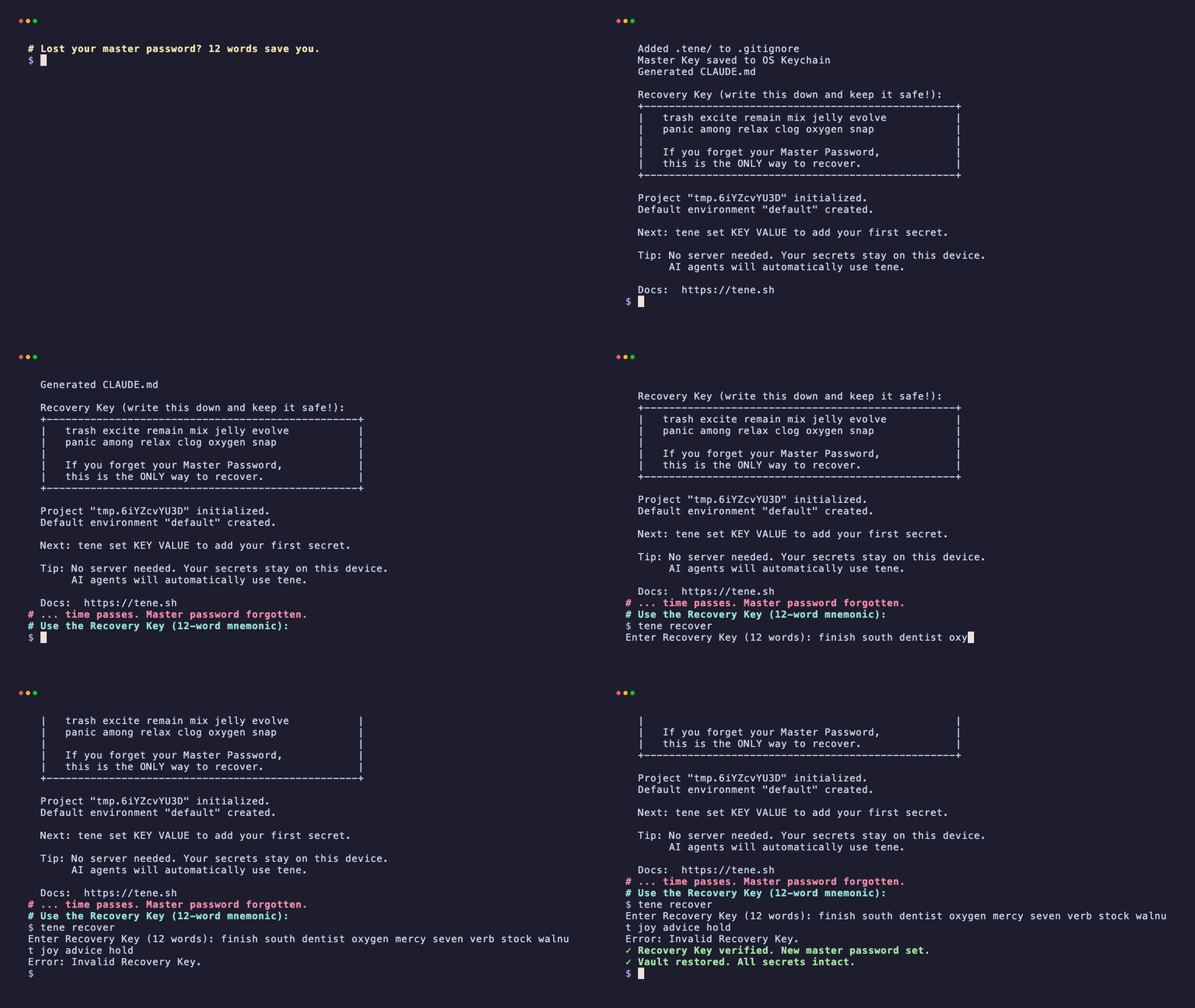
The clip above shows the whole recovery flow. Next up: what
tene recover actually does, step by step.
What happens when you run tene recover
The command is short. The steps are linear. Here's what runs under the hood:
tene recover
# Enter your 12-word recovery key (separated by spaces):
#
# > finish south dentist oxygen mercy seven verb stock walnut joy advice hold
#
# ✓ Mnemonic checksum valid.
# ✓ Recovery wrap unwrapped successfully.
#
# Set a new master password: ••••••••••
# Confirm:                   ••••••••••
#
# ✓ Vault re-wrapped with new password. Recovery key unchanged.Step by step:
- Checksum check. The 4 trailing checksum bits get rebuilt from the first 128. A typo in any word fails this check right away, before any heavy work. So if you type "advise" instead of "advice," the CLI catches it before it tries anything else.
- Build the recovery key. The 12 words are normalized (NFKD), passed through PBKDF2-HMAC-SHA512 with a fixed salt, and the result becomes the recovery wrapping key.
- Unwrap. The recovery wrapping key unlocks
wrapped_vault_key_recoveryand gets back the original vault key. If this works, your recovery key was right. - Re-wrap with a new password. You pick a new master password.
Argon2id makes a new password wrapping key.
wrapped_vault_key_passwordis replaced. The recovery wrap is left alone.
The vault key never changes. The ciphertext is never re-encrypted. Only the password-side wrapper is swapped out. That's why recovery is fast even on a vault with thousands of secrets.
What the recovery key protects against — and what it doesn't
Worth being honest about scope. The 12 words aren't a fix for everything.
What it protects against:
- Forgotten master password. The main use case.
- Single disk failure, if you also kept a backup of the encrypted vault file. The 12 words plus the ciphertext gets you back in.
- Brute-force guessing. 128 bits of entropy puts random guessing well past what any computer can do.
What it does not protect against:
- Losing both the password and the recovery key. No third path exists. By design. Adding one would mean adding a server.
- The recovery key getting stolen. If someone reads your 12 words, they have full vault access, even if you also know the password.
- Losing the vault file itself. The recovery key restores access to a vault, not the vault data. Backing up the ciphertext is still your job.
- Already-stolen passwords. If malware grabbed your master password before you set up recovery, the 12 words don't roll that back. Rotate your secrets from a clean machine.
Where to keep the 12 words
The recovery key only helps if you can get to it without unlocking the vault first. A few rules from people who've actually had to use one:
- Never digital alone. Don't store the words in a text file on the same machine as the vault. Don't put them in a notes app that syncs to the cloud. Don't take a photo with a phone that auto- uploads.
- Paper is fine. Metal is better long-term. A printed sheet in a drawer survives most household risks. Stamped metal plates survive fires and floods. Bitcoin folks go big on this; for most developers a printed sheet is enough.
- Two copies beat one. A copy at home and a copy in a relative's safe deposit box, or a sealed envelope with a lawyer. The point: survive losing one spot without making it easier to lose to a thief.
- Test it once. Before you trust the words, run
tene recoveron a throwaway vault with what you wrote. The checksum check catches typos that you'd otherwise find at the worst time.
There's no one right answer for storage. It depends on your threat model. The wrong answer is "I'll remember it." Past you can't promise that for future you.
Summary
- A master password by itself is one weak link in any local vault.
- BIP-39 12-word phrases pack 128 bits of entropy into writable form, with a 4-bit checksum to catch typos.
- The dual-unlock chain locks the same vault key twice — once with a password key, once with a phrase key — so either one can get you back in.
- The recovery key is just as powerful as the master password. Treat it the same way: never paste it into AI tools or cloud- synced storage, and keep the words in a physical spot separate from the vault file.
Terms used in this post
BIP-39 — A 2013 Bitcoin standard for turning a random number into a list of normal English words. Same 2048-word list everywhere.
Mnemonic / recovery phrase — The list of 12 (or sometimes 24) English words that BIP-39 produces. Easy to write down; very hard to guess.
Entropy — A fancy word for "how much randomness." 128 bits of entropy means there are 2^128 possible values. Way too many to guess.
Checksum — A few extra bits at the end of the phrase that prove the words weren't typoed. tene checks these before doing any unlock work.
Argon2id — A password stretcher. Turns a short password into a long key, while burning enough memory and CPU to make guessing painful.
PBKDF2 — Another password stretcher. Older than Argon2id, well studied, used here to turn the 12 words into the recovery wrapping key.
Wrapping key — A key whose only job is to lock another key. tene wraps the vault key twice — once with a password key, once with a recovery key.
Vault key — The 256-bit random key that actually encrypts your secrets. It's never stored in the clear; only the wrapped (locked) copies sit on disk.
FAQ
Is a 12-word recovery key as strong as my master password?
It encodes 128 bits of entropy by the BIP-39 standard, which is comparable to a long generated password. The strength is in the entropy, not the word count — fewer words means weaker. Most modern wallets and tene default to 12, which is the practical sweet spot between security and writeability.
What if my recovery key falls into the wrong hands?
It grants full vault access, exactly like the master password. Treat the 12 words as you would your master credentials — never store them in the same place as the vault file, never paste them into a chat or AI agent, and never photograph them with a phone that auto-uploads to the cloud.
Why not just use a key-file backup instead?
A key file is brittle: it lives on the same kind of disk that just failed, it has no checksum to detect bit-rot, and it cannot be split across locations easily. A 12-word phrase can be hand-written, printed, memorized, or stamped into metal — it survives hardware failure that a key file does not.
Does the recovery key still work after my laptop dies?
Only if the vault file itself was backed up. The recovery key recovers access to a vault — it does not regenerate the encrypted data. Back up the encrypted vault file separately; ciphertext is safe to push anywhere, including a public bucket.
Related reading: