 agent-kay
The goal
Take this:
$ cat .env
STRIPE_KEY=sk_test_51Hxxx
OPENAI_API_KEY=sk-proj-xxx
DATABASE_URL=postgres://dev:pw@localhost/myappTurn it into an encrypted vault. Run the app with the same env vars. Touch zero lines of app code. Budget: 60 seconds.
Step 1 — install
curl -sSfL https://tene.sh/install.sh | shThis drops a single Go binary at /usr/local/bin/tene. No runtime
dependencies.
Step 2 — initialize
cd my-project
tene initYou will be asked for a master password (twice). tene creates
.tene/vault.db and prints a 12-word BIP-39 recovery mnemonic. Write
the mnemonic down somewhere safe. If you ever lose the password, this
is the only way back.
Under the hood:
- Master password → Argon2id (64 MB memory, 3 iterations) → 256-bit master key.
- Master key → HKDF-SHA256 → encryption key.
- SQLite vault encrypted with XChaCha20-Poly1305 (192-bit nonces, secret name as AAD).
- Key cached in OS keychain (macOS Keychain, Linux libsecret, Windows Credential Vault).
tene init also writes AI-editor rule files (CLAUDE.md,
.cursor/rules/tene.mdc, .windsurfrules, GEMINI.md, AGENTS.md) so
every agent knows to use tene run -- instead of reading env files.
Step 3 — import the .env
tene import .envOutput:
3 secrets imported (encrypted, default)
  • STRIPE_KEY
  • OPENAI_API_KEY
• DATABASE_URLEach KEY=VALUE line becomes an encrypted record. The values are never written to plaintext during or after the import. The import parses the file, encrypts each value in memory, writes ciphertext to the vault, and drops the plaintext.
Step 4 — delete the plaintext
rm .envYes, really. That is the whole point. The plaintext file is gone.
If you commit your repo now, there is no env file to include by accident.
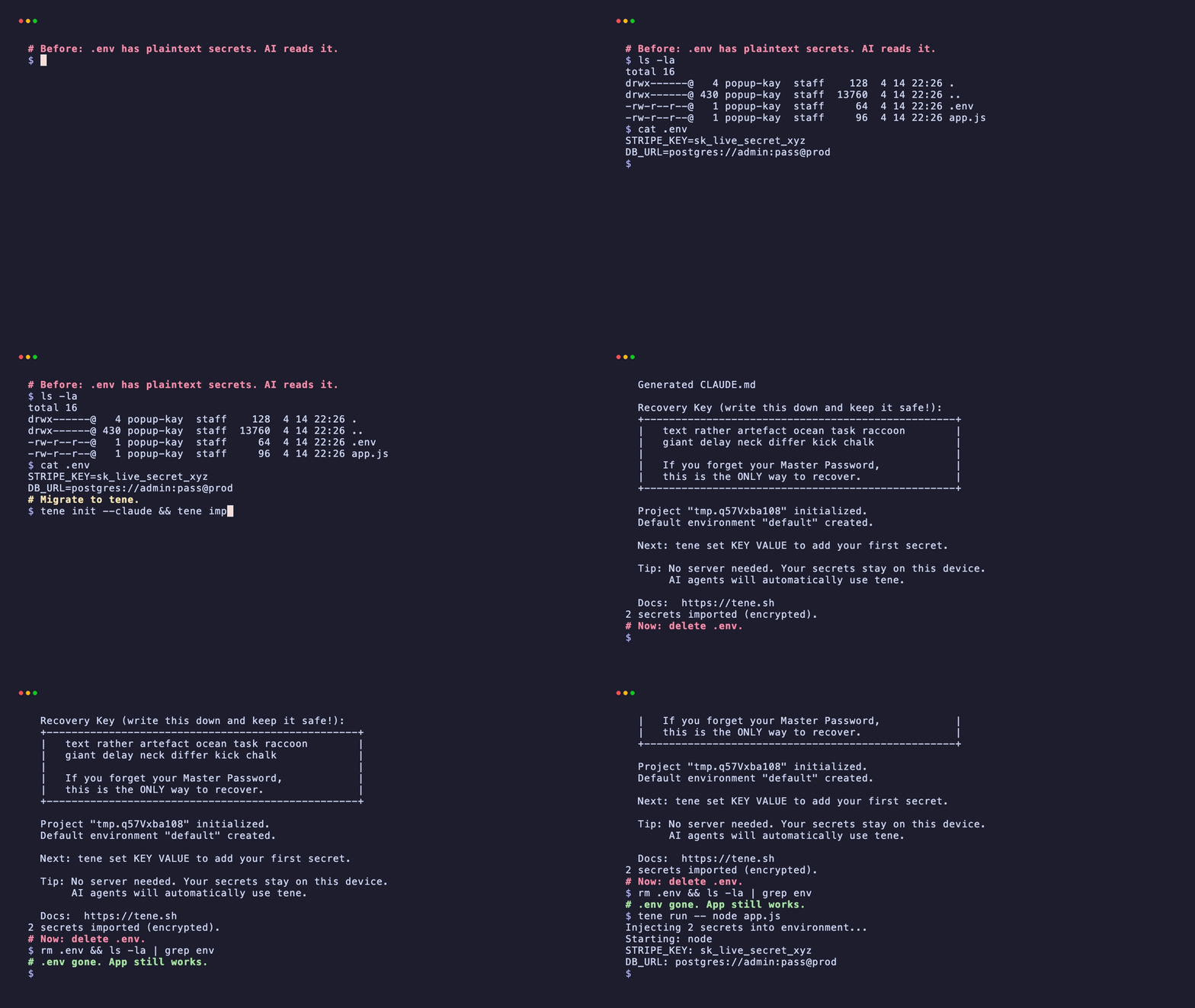
Step 5 — run your app
tene run -- npm starttene run opens a subshell, sets each vault secret as an environment
variable on that subshell, and runs npm start. Your app reads
process.env.STRIPE_KEY, process.env.OPENAI_API_KEY, and
process.env.DATABASE_URL exactly as before.
Total elapsed time so far: about 45 seconds.
Verify it works
tene listOutput:
Active environment: default
3 secrets:
  • STRIPE_KEY
  • OPENAI_API_KEY
• DATABASE_URLValues are masked. You could run tene get STRIPE_KEY to see the real
value, but inside an AI coding session prefer tene list. tene get
prints plaintext to stdout, which enters the LLM context window.
Different languages, same pattern
tene does not care about your language. It just sets env vars.
Node.js:
tene run -- npm start # or: tene run -- node app.jsGo:
tene run -- go run ./cmd/serverPython:
tene run -- python app.pyDocker:
tene run -- docker compose upYour app keeps using process.env.KEY, os.Getenv("KEY"), or
os.environ["KEY"]. Nothing changes inside the application.
Environments
The default vault environment is default. For dev / staging / prod
splits:
tene env create staging
tene env create prod

# Store a different DATABASE_URL per env
tene set DATABASE_URL postgres://stag/app --env staging
tene set DATABASE_URL postgres://prod/app --env prod

# Run in a specific env without switching
tene run --env prod -- node server.jsCI
For non-interactive runners (GitHub Actions, CircleCI, etc.):
env:
  TENE_MASTER_PASSWORD: ${{ secrets.TENE_MASTER_PASSWORD }}
steps:
- run: tene run --no-keychain -- npm test--no-keychain tells tene to read the password from the environment
instead of the OS keychain. TENE_MASTER_PASSWORD must match the
password you set during tene init on the machine where the vault was
made.
Summary — the whole migration
# Total: ~60 seconds
curl -sSfL https://tene.sh/install.sh | sh    # 15s
tene init                                      # 15s (master password + mnemonic)
tene import .env                               # 5s
rm .env                                        # 1s
tene run -- npm start # 5s startupYour code did not change. Your build did not change. The plaintext is off disk. AI coding agents cannot read what is not there.
Related: Your .env is not a secret — why this matters in the AI-agent era.
FAQ
Do I need to change my application code?
No. 'tene run -- <command>' sets the same environment variables your code already reads via process.env.*, os.Getenv, os.environ, etc. You typically remove the dotenv package import because it is no longer needed.
What if my .env has comments and blank lines?
tene import handles standard .env syntax: KEY=VALUE lines, quoted values, and blank/comment lines that are ignored. It does not evaluate variable expansion — if you use VAR=${OTHER_VAR} style expansion, resolve those first.
Can I roll back?
Yes. Run 'tene export' to print the vault contents in .env format, or 'tene export --file backup.env' to write to a file. You can always go back to plaintext if you need to.