 agent-kay
Why multi-environment is where solo devs hit the wall
Your first project fits in a single .env file. The second one — once staging or production shows up — is where things start to crack. Secret prefixes drift. A .env.production slips into git by accident. Your AI agent quietly reads every .env.* file in the project root, no matter which environment you meant to run.
Cloud secret managers solve this with dashboards and per-seat pricing. That math doesn't work for a solo dev with five hobby projects, and it adds a network dependency to local work. The middle ground — running dev, staging, and prod secrets locally without leaving a graveyard of dotenv files behind — is the part most write-ups skip.
What breaks when you split .env.dev / .env.staging / .env.prod
The naive fix is one file per environment. It looks tidy until you actually run the project for a few weeks:
- Drift between files. A new key gets added to
.env.dev, but.env.stagingis forgotten. The next deploy fails for a reason that has nothing to do with code. - Accidental commits.
.gitignorecovers.env, but you forgot the wildcard..env.productionlands in a public repo. Now you're rotating secrets at 1 a.m. - No isolation from AI agents. Claude Code, Cursor, and Windsurf read
.env,.env.local,.env.production, and friends as part of project context. The plaintext threat model is the same whether you have one file or four. - Different injection paths.
next devauto-loads.env.local.next startdoes not. Your CI uses a separate dotenv loader. Three slightly different runtimes, three places to misconfigure.
One vault, many environments
tene collapses the file split into a single encrypted vault with named environments inside it. There's one .tene/ directory, one master password, and one place to look when a key is missing.
# One-time install + init
curl -sSfL https://tene.sh/install.sh | sh
tene init

# Create named environments alongside the default
tene env create staging
tene env create prod

# Inspect what exists
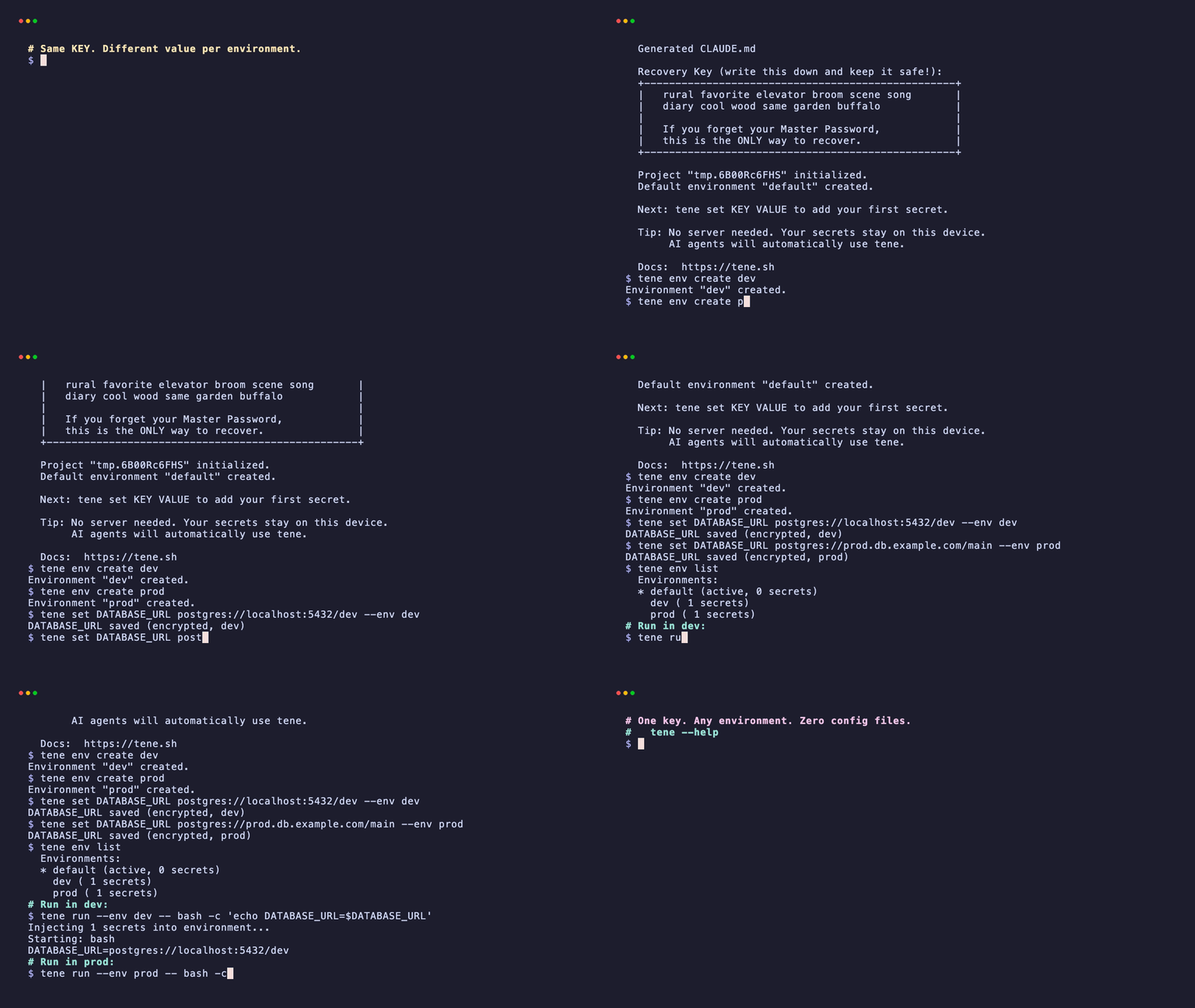
tene env listtene env list shows every environment plus an arrow next to the active one. The active env is a per-machine pointer. You can switch with tene env staging, or override per-command with --env.
The day-to-day workflow
The most common job is the same key with different values across environments. With separate .env.* files that means editing two or three files and hoping you got the spelling right. With tene it's one command per pair.
# Same key, three different values — one command each
tene set DATABASE_URL postgres://localhost/dev_db
tene set DATABASE_URL postgres://staging.db/app --env staging
tene set DATABASE_URL postgres://prod.db/main   --env prod

tene set STRIPE_SECRET sk_test_dev_xxx
tene set STRIPE_SECRET sk_live_prod_xxx --env prodRunning the app picks up whichever environment is active right now:
# Use active env (default or whatever you switched to)
tene run -- npm start

# Override per invocation — useful for one-off prod smoke tests
tene run --env prod -- npm run smoke-testThe application code doesn't change. process.env.DATABASE_URL reads whatever value got injected for the chosen environment. There's no second loader, no environment-specific build flag, and no risk of leaking the prod key into a dev shell.
Three patterns that actually work
Most solo and small-team setups land in one of three modes. Pick the one that matches how the project ships today, not the architecture you wish you had.
Pattern A — local only. Two environments: default and prod. You build with default, run prod smoke tests with --env prod, and deploy through a host (Vercel, Fly, Railway) that owns its own copy of prod secrets. The vault is your source of truth on the laptop. The host is the source of truth at runtime.
Pattern B — branch-based. Three environments: default, staging, prod. default mirrors production schemas with safe seed data. staging points at a real shared database. prod is read-only on the laptop. The vault is the single sync point. When you rotate a key, you rotate it in tene and push to the host once.
Pattern C — CI inject. Same vault, plus a one-shot export when CI needs the values. The vault never leaves the laptop, but a short script writes the values into the CI provider's secret store on rotation:
# Rotate prod key once, push the new value to GitHub Actions
tene set STRIPE_SECRET sk_live_new_xxx --env prod
gh secret set STRIPE_SECRET --body "$(tene get STRIPE_SECRET --env prod --raw)"The rotation lives in shell history, not in a SaaS dashboard, and there's no monthly subscription per project.
Common mistakes (and how tene whoami saves you)
These are the traps that show up in week three, not week one:
- Running prod by accident. You meant to test against dev, but the active env is still
prodfrom this morning. Runtene whoamibefore any destructive command — it prints the active environment in one line. - Same value across all envs. If
OPENAI_API_KEYis identical in dev and prod, put it indefaultonly. Environments are for values that actually differ. Over-segmenting just creates more rotation work. - Forgetting
--envon writes.tene set X ywrites to the active env. If you wanted prod, you needed--env prod. The vault tells you what's set withtene list --env prod— verify after every batch of writes.
Summary
- One encrypted vault replaces N plaintext
.env.*files. Environments are namespaces inside it, not separate files. - The same application code runs against any environment via
tene run --env <name> -- <command>. - Three operating patterns cover most projects: local-only, branch-based, and CI inject. Pick by deployment shape, not by team size.
tene whoamiandtene list --env <name>are the two commands that prevent the multi-env mistakes that show up in week three.
Terms used in this post
Environment (in tene) — A named slot inside one vault — like default, staging, or prod. Each slot can hold a different value for the same key.
Active environment — The slot tene reads from when you don't pass --env. Set per machine with tene env <name>. Check with tene whoami.
Runtime injection — Loading secrets into a child process at the moment it starts, instead of writing them to a file on disk. What tene run -- does.
FAQ
How is this different from splitting .env into .env.dev, .env.staging, and .env.production?
A single encrypted vault file replaces N plaintext files. AI agents read every .env.* in the project root by default, so the file split does not buy you isolation — it just multiplies the attack surface. tene gives you one mental model and one ciphertext blob; environments are namespaces inside it, not separate files.
Can a teammate access my staging secrets without a cloud subscription?
The free CLI is strictly local — no team sync. The optional Pro tier adds client-side-encrypted sync; the server only sees ciphertext, and each teammate decrypts with their own master password. For a solo developer, the free tier is enough.
What if I have six or more environments — preview, qa, demo, etc.?
It works the same, but six environments is usually a sign you should consolidate. Per-feature-branch envs become noise quickly. dev / staging / prod covers most projects; add review-app envs only when an actual stakeholder reviews them.
Related reading: