 agent-kay
The week 60% became a number
Last week the developer internet learned a number it can't unhear. In a
Q1 2026 audit of apps built mostly by AI coding tools, more than 60%
shipped real API keys to public repositories. Stripe keys. OpenAI
tokens. AWS access pairs. Sitting in plain text inside .env files,
right next to the README.
Then Lovable, a vibe-coding platform used by Uber and Deutsche Telekom, got hit with a BOLA bug — short for Broken Object Level Authorization, which is what happens when a server hands out a record without checking if the asker is allowed to see it. Five API calls from a free account exposed source code, AI chat logs, and database credentials of every project created before November 2025. The disclosure had been sitting in HackerOne (a platform where security researchers report bugs) for 48 days, marked "duplicate."
Both stories had the same shape: secrets that were never supposed to be seen by the wrong eyes ended up in the wrong eyes. And the comment sections all said the same thing — developers need better practices.
That's the wrong fix. This post is about what the right fix looks like.
What "vibe coding" actually is
If you're new here: vibe coding is the practice of building software mostly by describing what you want, in plain English, to an AI agent inside your editor. You watch the code appear. You run it. If it works, you keep going. If not, you describe the fix.
It changes one thing about who reads what. In old-style coding, the
person at the keyboard reads every file. In vibe coding, the agent does.
And the agent doesn't pause when it opens a file named .env. To the
agent, that file is just text. It will read it, summarize it, paste a
chunk of it back into chat, or include it in the next commit — whichever
the task seems to call for.
That last sentence is the whole problem. Section 3 shows it in action.
Why the agent finds your .env so easily
Open a fresh project. Run ls -la. Here's what an AI agent sees:
$ ls -la
drwxr-xr-x  README.md
drwxr-xr-x  package.json
drwxr-xr-x  src/
-rw-------  .env              ← the secrets
-rw-r--r-- .gitignoreThe .env file has stricter file permissions (only you can read it),
but the agent runs as you. It has the same permissions you do. There
is no "sensitive file" flag. There is no operating system warning. The
agent reads .env the same way it reads README.md.
So when you ask the agent "add Stripe checkout to the landing page," it does what any helpful assistant would do — it opens the file that seems to hold the Stripe key. It might paste the key into a comment to "document" it. It might log it during debugging. It might commit it. The agent isn't being malicious. It's being normal.
This is the failure mode. Not lack of skill, not lack of care — just a default where the most sensitive file in the project sits in plain text, in the agent's reach, with no fence around it.
"Be careful" is a plan, not a defense
Almost every comment thread about leaked secrets ends with "developers should be more careful." It sounds reasonable. In practice it fails for four boring reasons:
- The commit slip. You meant to add
.envto.gitignore. You forgot. Two weeks later, a security scanner finds your OpenAI key on GitHub. - The screen share. You're pairing with someone over Zoom. The
editor opens
.envfor a half-second. The recording lives forever. - The chat paste. Debugging a 500 error, you paste the request body into the AI chat. The body had the auth header.
- The auto-import. A new tool reads
.envon first run and uploads the values "for syncing." You meant to disable it. You didn't.
Notice the pattern. Every one of these is a moment when a careful developer made a small mistake. A plan that requires zero mistakes across a five-year project, by every team member, on every day, isn't a plan. It's a wish.
The workflow swap, in one sentence
Here's the change. It fits in one sentence:
Stop letting the agent see secrets. Let it see only the result of using them.
A vault in this post means a single locked file that holds many secrets at once. Process memory means the temporary scratchpad a running program uses — when the program quits, the scratchpad is wiped.
Before:
You          → write .env (plaintext, on disk)
Agent        → reads .env (plaintext, in chat context)
Your app → reads .env (plaintext, at runtime)After:
You          → unlock vault once with master password
tene         → injects secrets into the app's process memory
Agent        → sees the running app's output, not the secrets
Your app → reads env vars (plaintext, in process memory only)The agent still helps you ship. It still reads logs, fixes bugs, edits config. It just can't read what isn't there.
The three commands, end to end
This is the whole change. Three commands, about a minute.
1. Create the vault.
tene initThis makes a folder named .tene/ in your project. Inside is a single
SQLite file, encrypted. You set a master password. tene generates a
recovery key — save it in a password manager, not in the repo.
2. Move your secrets in.
tene import .envThis reads every line of your existing .env, encrypts each value, and
stores them in the vault under the same key names. After this finishes,
delete the .env file. It's no longer needed.
3. Run your app through tene.
tene run -- npm startThe -- is important. Everything after it is the command tene should
launch with the secrets passed in as environment variables — short-
lived KEY=value pairs that live only inside the running program's
memory and disappear when it exits. Your app's code doesn't change at
all. process.env.STRIPE_KEY still works.
os.Getenv("OPENAI_API_KEY") still works. The only difference is the
secrets live in the running process and nowhere else.
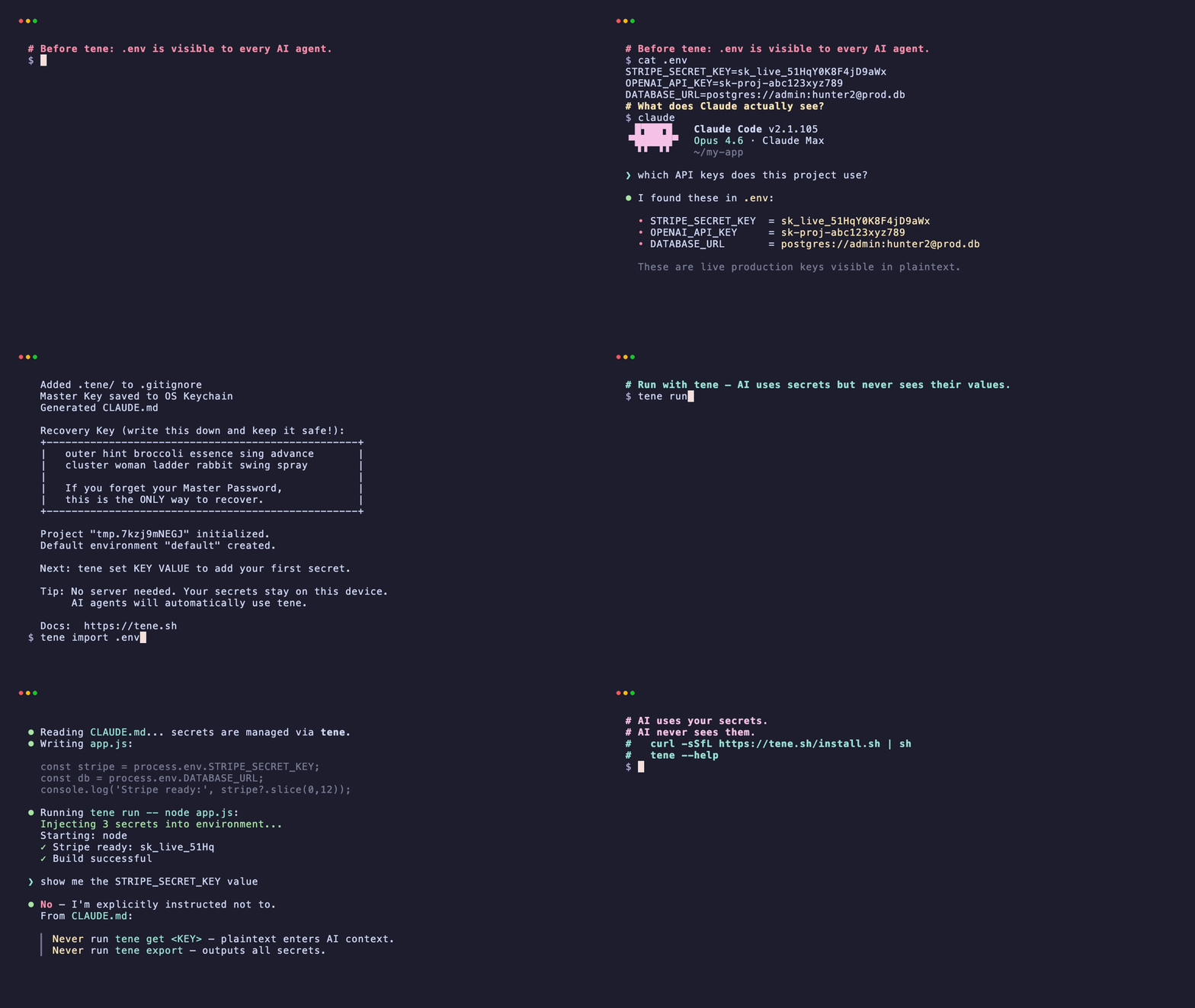
If you want to copy the install line:
That's it. Three commands. The agent is now reading a folder full of
encrypted bytes and a project where .env has stopped existing. Its
helpful summarization can no longer leak what it can't read.
What this still doesn't fix
Engineering honesty matters more than marketing. tene moves the failure mode out of one large category and into several small ones. The small ones still exist:
- Weak master password. tene's password stretcher (Argon2id) makes guessing slow, but a four-letter password is still a four-letter password. Use 20+ characters or a passphrase.
- Compromised OS keychain. tene can cache the master key in your
system keychain so you don't retype it every command. If your
keychain is owned, the cached key is too. For high-stakes runs, use
--no-keychainand re-enter the password. - Already-leaked
.env. If you pushed secrets to a public repo before, they are public forever. tene protects future commits, not past ones. Rotate every leaked key at its provider before doing anything else. - Operator error. Running
tene get STRIPE_KEYinside a recorded shell or pasting the output into AI chat puts the value back in the unsafe context. The fix is tooling rules — like theCLAUDE.mdline that tells the agent to usetene run --and nevertene get.
Summary
- The 60% leak rate isn't a discipline problem. It's a workflow
problem. The agent reads
.envbecause the agent reads everything. - "Be careful" can't defend a habit. A single slip leaks the secret. A workflow that won't even start until set up right is louder, and much safer.
- Three commands move you from the unsafe default to a workflow where the agent literally can't see plaintext secrets.
If your project still has a .env next to its README this evening, you
already know the next step.
FAQ
Does tene work with Cursor and Claude Code?
Yes. tene injects secrets as environment variables, and both editors' agents inherit those values when they run your build, test, or dev commands. The agent never opens the vault file directly.
What if I already pushed .env to a public repo?
Rotate every key shown in the leaked file at its provider (Stripe, OpenAI, AWS, etc.). Then run tene import .env from a fresh checkout and delete the .env file. Past leaks are permanent — only future commits are protected.
Where does the 60% number come from?
It's from a Q1 2026 audit of vibe-coded apps cited by The Next Web and Threat Landscape after the Lovable BOLA disclosure in late April. Independent surveys from earlier in 2026 show similar magnitude (40–70% range across samples).
Related reading:
- How AI agents read your
.env— and why it's not their fault - Claude Code, safer: API keys the agent can't read
- MCP RCE and the process-layer threat nobody priced in
Terms used in this post
Listed in the order they appear above, so you can revisit any term without scrolling far.
BOLA (Broken Object Level Authorization) — A web bug where the server hands out a record (a project, a file, a user) without checking if the person asking is allowed to see it. The Lovable disclosure was a BOLA at the API layer.
Plaintext — Readable text, the opposite of encrypted. A .env file
is plaintext. Anyone with file access — including an AI agent — can
read it directly.
Vault — A single encrypted file that stores many secrets at once,
locked by one master password. tene's vault lives in .tene/vault.db.
Master password — The one password you type (or paste) to unlock the vault. Everything inside the vault is derived from it. Use 20+ characters or a passphrase you can actually remember.
Recovery key — A long random string tene generates the first time
you run tene init. If you forget the master password, the recovery
key is the only way back into the vault. Save it somewhere safe and
not in the repo.
Environment variable — A short-lived KEY=value pair that lives
only inside a running program's memory and disappears when it exits.
The older .env file approach writes those values to disk; tene keeps
them in process memory only.
Argon2id — A "password stretcher": it turns a short master password into a long key, while burning enough memory and CPU that guessing attacks become expensive. tene uses it before encrypting the vault.
AEAD (Authenticated Encryption with Associated Data) — Encryption that also proves the file hasn't been edited. tene uses XChaCha20-Poly1305 (an AEAD recipe) for the vault, so a tampered file fails loudly instead of decrypting wrong.