 agent-kay
The pattern in one paragraph
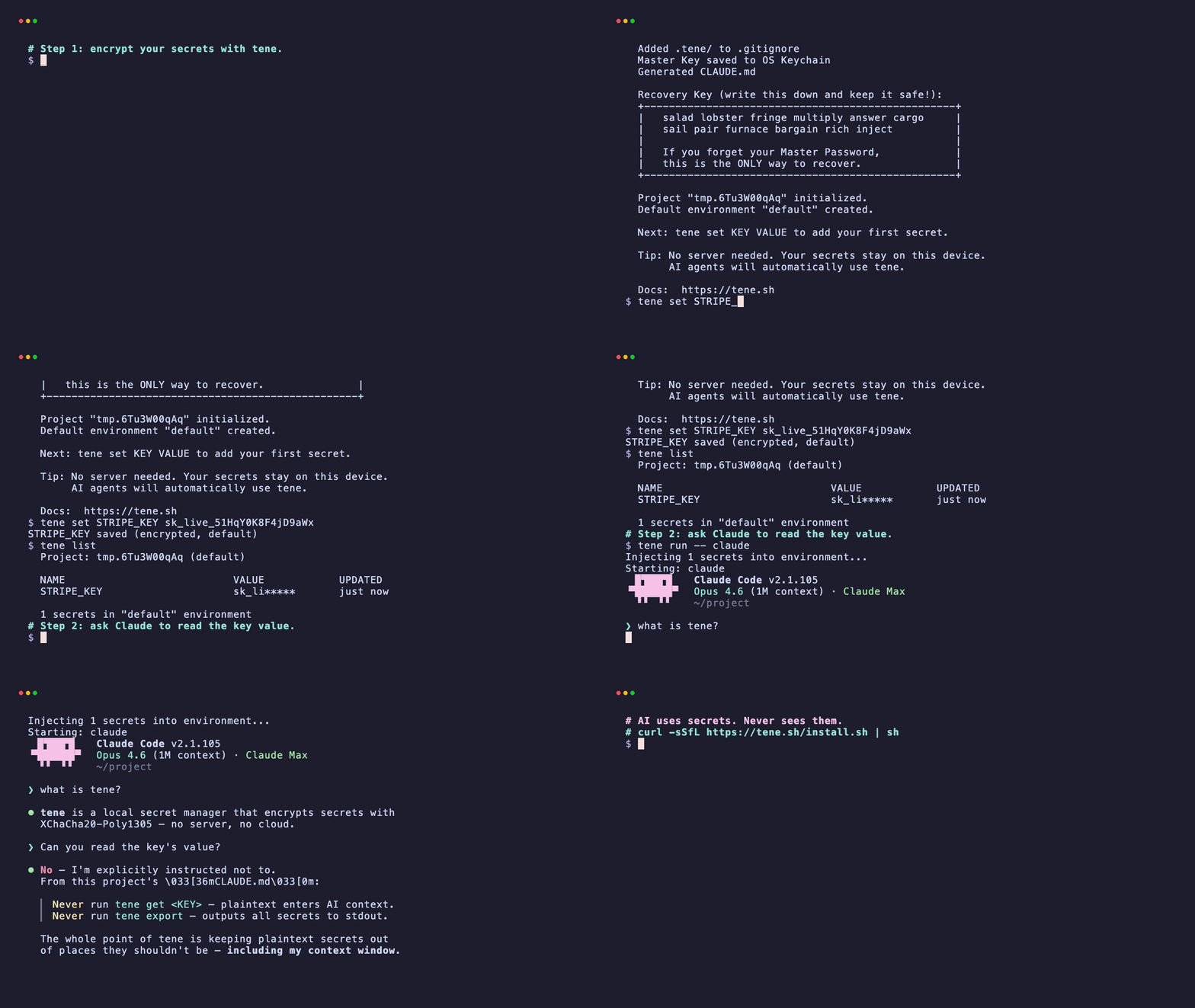
Run tene init once per project. It makes a local encrypted vault and
writes a CLAUDE.md file that teaches Claude Code how to handle secrets.
Start Claude Code with tene run -- claude so the agent's subshell has
the env vars but the plaintext never hits disk. Use tene set to add a
new secret, tene list to see what is there, and never tene get KEY
inside Claude Code's terminal — that prints the value.
Why the default Claude Code setup is unsafe
Out of the box, Claude Code reads project files as part of its context.
If your project has a .env at the root, the agent can read it. The
plaintext lands in the model's context window. Every chat with the agent
— tool_result blocks, session summaries, auto-generated commit messages
— may carry those values.
You can tell one session not to read .env. That instruction does not
carry to the next session. Or to another machine. Or to CI. The fix has
to be structural — the plaintext must not exist on disk.
Step-by-step safe setup
1. Install tene and initialize a vault
curl -sSfL https://tene.sh/install.sh | sh
cd my-project
tene inittene init asks for a master password, derives a master key with
Argon2id, and creates .tene/vault.db — an empty SQLite file encrypted
with XChaCha20-Poly1305. It also adds .tene/ to your .gitignore
and writes a set of AI-editor rule files: CLAUDE.md,
.cursor/rules/tene.mdc, .windsurfrules, GEMINI.md, AGENTS.md.
Each rule file tells the local agent:
- Never hardcode secrets in source.
- Never create
.env— usetene run -- <command>to inject them. - Prefer
tene listovertene get KEYin AI context. - Read secrets via
process.env.KEY_NAMEin your code.
2. Import existing secrets
If you already have a .env:
tene import .env
rm .envtene import reads the file line by line and encrypts each value into
the vault. The plaintext file is no longer needed.
3. Launch Claude Code through tene
tene run -- claudeThis opens a subshell, decrypts the vault in memory, sets each secret as
an env var on the subshell, and starts claude inside it. Code in the
subshell reads process.env.STRIPE_KEY or os.getenv("OPENAI_API_KEY")
exactly as before. The file on disk stays ciphertext.
4. Work normally
Inside Claude Code, ask the agent to debug, run tests, refactor — the
usual. When the agent's code needs a secret, it will use process.env.*
just like your handwritten code does. It will not see the raw values.
Only the fact that certain env vars exist.
When you need to add a new secret, ask Claude Code something like: "We need a new ANTHROPIC_API_KEY — can you remind me to store it in tene?" The agent will produce a command like:
tene set ANTHROPIC_API_KEY sk-ant-api03-xxxxxYou run that yourself. The agent never types the raw value.
Example: adding Stripe
Before tene:
1. Open .env in editor
2. Paste STRIPE_KEY=sk_test_...
3. Ask Claude Code to wire up a webhook handler
4. Claude Code reads .env, plaintext goes into contextWith tene:
tene set STRIPE_KEY sk_test_51Hxxxxx
tene run -- claude
# Inside Claude: "wire up a /webhooks/stripe handler"
# Claude generates code using process.env.STRIPE_KEY
# The actual value is injected at runtime; Claude never sees sk_test_51HxxxxxExample: rotating OpenAI keys
# Old key is at OPENAI_API_KEY
tene set OPENAI_API_KEY sk-proj-newvalue-xxxxx --overwrite

# Restart whatever is running
# No file edit, no commit, no Claude context pollutionCommon mistakes
Running tene get OPENAI_API_KEY inside Claude Code. That prints
the plaintext to stdout, which Claude reads. The CLAUDE.md rule says
don't. Prefer tene list (names only) to check whether the key exists.
Committing .tene/vault.db. Don't. tene init already adds it to
.gitignore. The vault belongs on your machine, not in the repo.
Writing values in code comments "for reference". Even redacted notes leak in cleartext. Keep the vault as the only source.
Reusing your account password as the master password. The master password is for the vault only. Treat it like a recovery phrase.
Summary
tene initplus the generated CLAUDE.md = a structural rule that survives across sessions.tene run -- claude= the only launch command you need.- Claude Code works as usual; it just never sees plaintext values.
- Rotate by
tene set KEY new-value --overwrite. No code changes.
Deep dive on the threat model: Your .env is not a secret. Moving from dotenv-vault: dotenv-vault alternatives.
FAQ
Does Claude Code really read .env?
Yes, by default. Claude Code indexes project files to build context for reasoning. That includes .env unless you explicitly exclude it via the project's CLAUDE.md or similar mechanism.
What does 'tene init' change in my Claude Code project?
It creates a CLAUDE.md at the project root that tells the agent to use 'tene run --' and 'tene list' instead of reading env files, and to avoid 'tene get KEY' in AI context since that prints plaintext to stdout.
Can I share the vault with a teammate using Claude Code?
The free CLI is strictly local. For team sync there is an optional Pro plan that uses client-side encryption — the server only sees ciphertext. Each teammate gets the vault after 'tene pull' + master password verification.